


From Plan to Proof: How to Simplify Consultation Outreach and Response Tracking
Topics
Good public consultations in town planning are not only about asking good questions. It is also about showing that the right people had a fair opportunity to take part. That’s why suitable consultation promotion is essential to reach the intended audience in the right way, excite and engage, and tell about the project.
For many planning and design teams, that is where the work becomes fiddly. Different projects require a widely different approach and it’s not always easy to know what works best. Added to that, beyond promotion planning, it’s also essential to have clear and easy ways to capture what was done and any outcomes.
These tasks often end up spread across several places: spreadsheets, mail merge files, email tools, folders with various leaflet copies, and manual notes. That can work for a small project, but it is hard to keep clean. It also makes it harder to answer simple questions later:
- Which addresses did we invite?
- What material did we send?
- When did it go out?
- Who marked it as delivered?
- Which residents responded?
- Which property or address was the response linked to?
We have been improving PlaceChangers to make those steps easier to plan, invite and track in one place.
Fulfilling SCI vs. POE: Two Different Outreach Scenarios
Let’s take two widely different projects to see how promotion outreach, approach, and documentation needs differ.
| Feature | Scenario 1: Pre-App Consultations (SCI) | Scenario 2: Post-Occupancy Evaluations (POE) |
|---|---|---|
| Outreach Type | One-off, intensive campaign | Scheduled, rolling lifecycle |
| Audience Sourcing | GIS boundary radius search | Property list import (CSV/Excel) |
| Channels | Direct mail, social media ads, public notices | Scheduled email triggers, direct mail |
| Response Needs | High-level area-based demographics | Property-specific response attribution |
| GDPR Scope | Broad consent for project follow-ups | Strict decoupling of personal data & unit feedback |
In both cases, project delivery teams need a reliable record of outreach, not just a list of survey responses.
Plan your outreach: Outline Outreach Activities Before It Happens
The first step is planning the outreach.
In PlaceChangers, a team can now create outreach plans for a site. These plans can be used for one-off promotion work, such as a mailshot before a public consultation, or for scheduled outreach, such as a resident invite after a move-in date.
Scenario 1: Pre-app planning consultation. For a one-off planning consultation, a team might plan:
- a letter to nearby households
- a social media advert
- a public notice
- an email to existing project followers
Scenario 2: Post completion evaluations. For a post-occupancy project, a team might plan:
- an invite letter 30 days after a resident moves in
- a follow-up message if there is no response
- a formal invite to the post occupancy survey one year past move-in
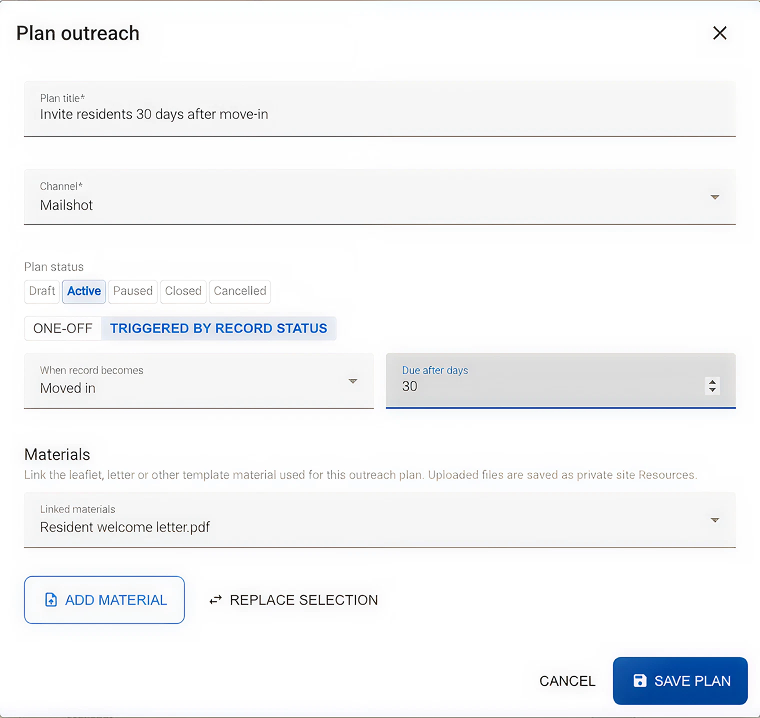
This gives the project team a shared place to see what has been planned, what is active, and what is still waiting to be done.
Invite your audience: Build or Import the Right Audience
Different projects need different outreach lists.
Scenario 1: Pre-app planning consultation. For an SCI or pre-application consultation, the audience may start with a map. A team may need to find households around the site boundary, review a promotion area, and prepare a letter campaign for nearby addresses.
Scenario 2: Post completion evaluations. For a POE or resident survey, the audience may already exist as a property, apartment or address list. In that case, the team can import the list into the Contact Manager and use it as the project outreach list.
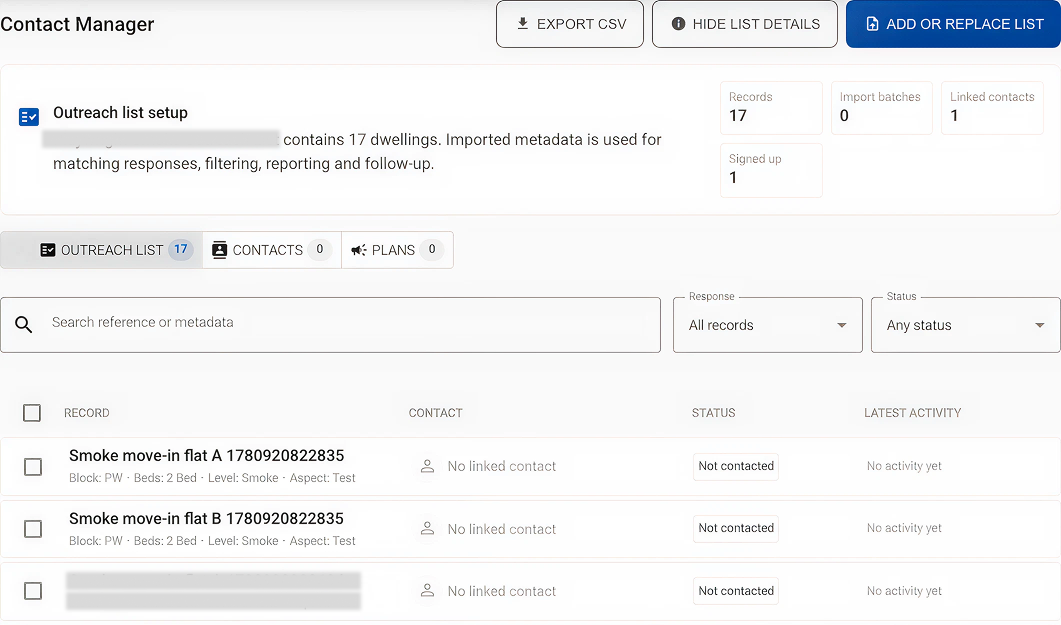
Typically, one might rely on spreadsheets to store outreach lists in a folder. A better approach on PlaceChangers enables tracking known address, property, unit or organisation and outreach completed against either of them in one single place.
Track: Keep a Clear Record of What Happened
Once invitations go out, PlaceChangers automatically tracks delivery status and attributes responses to the correct property record. Teams can record a delivery against an outreach plan, link material such as a leaflet or letter, and see scheduled actions against the relevant property or record.
For example:
- A property status is changed to "Moved in".
- An active outreach plan schedules a resident invite 30 days later.
- The scheduled action appears in the property record.
- A team member marks the delivery as completed.
- The activity trail records the action, the date and who marked it off.
Scenario 1: Pre-app planning consultation. Link the PDF copy of the leaflet or letter directly to the outreach plan. If a planning committee or council officer asks exactly what material was distributed and when, the platform provides a verified, time-stamped audit trail for your consultation report.
Scenario 2: Post completion evaluations. For POEs, understanding which apartment reported drafty windows or heating issues is vital. When a resident scans the QR code on their letter, their response is automatically attributed back to their apartment in the Contact Manager, without exposing their personal details.
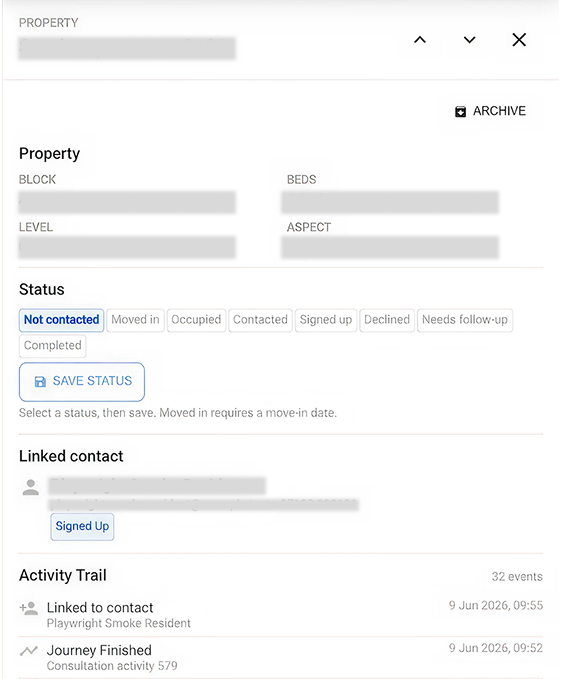
That creates a cleaner path from planned outreach to recorded delivery.
Best practice approaches for promotion tracking
Pre-Application Consultation
For design teams delivering consultations for residential and other development towards planning applications, it’s key to show how nearby residents were invited and through which means.
In tools like PlaceChangers, this is now incredibly easy:
- Use the site boundary as the starting point for planning a promotion area.
- Prepare a one-off outreach plan for a letter or leaflet campaign.
- Link the material used for the invite.
- Record when the distribution was completed.
- Keep the activity trail available for the consultation report.
- Track responses and follow-up contacts through the Contact Manager.
This does not replace professional judgement as to the proportionality of the outreach. It provides the tooling to arrange and track promotion in a reliable manner and it reduces the administrative burden of proving what was done.
Post Occupancy Evaluation
For more complicated projects, where detailed tracking per property is needed and where outreach might even need to be sensitive to timing of resident move-in, delivery teams need to capture promotion actions against an established property schedule. Here it’s key to build a reliable outreach schedule and complete actions reliably over time, such as 30 days after move-in.
In tools like PlaceChangers, this is now incredibly easy:
- Import a property schedule with suitable meta data (address, property characteristics)
- Configure your consultation with personal detail consent and option to let respondents attribute their response to a property
- Prepare a one-off outreach plan for a letter or leaflet campaign.
- Record when the distribution was completed. When the invite is delivered, the team marks it off.
- Responses are automatically attributed to properties in a privacy compliant manner.
- Track responses and follow-up contacts through the Contact Manager.
This gives the team a clearer picture of:
- which homes are occupied
- which homes have been contacted
- which residents have responded
- which follow-up actions are still due
For POE, that can be much easier than trying to reconcile survey responses, tenancy records and email lists by hand.
What Comes Next
Consultation promotion will continue to evolve. Future work can make reporting even smoother, especially where teams need a formal SCI evidence pack or a structured POE report.
The direction is clear: outreach planning, audience selection, invite delivery, response attribution and reporting should sit together. Planning teams should not have to rebuild the story from disconnected files at the end of a project.
PlaceChangers is moving towards that simpler workflow, so teams can spend less time managing spreadsheets and more time understanding what communities are telling them.
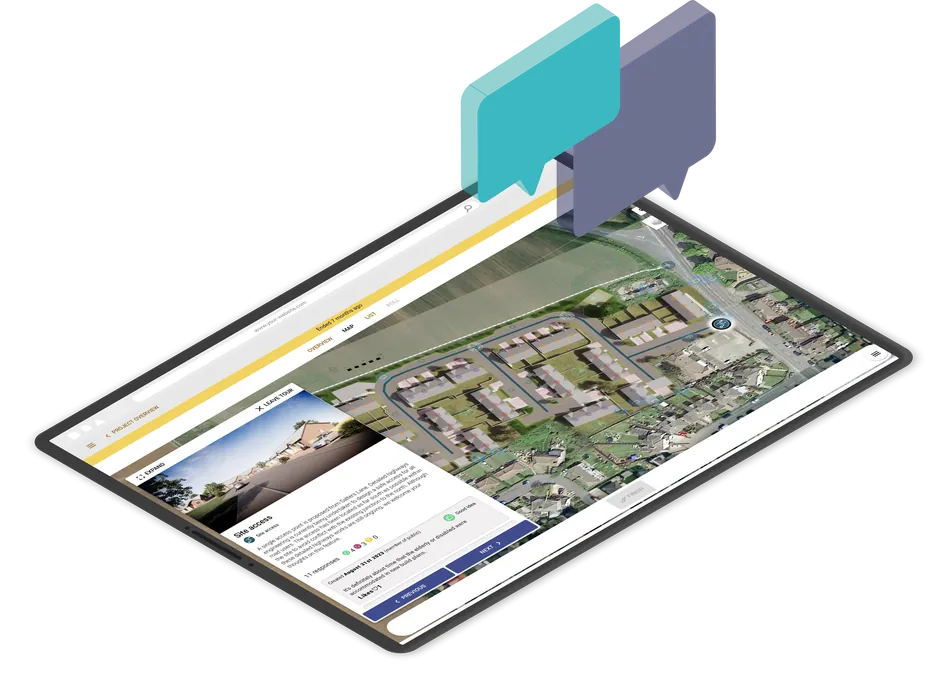
Run interactive community consultations online
Book a demo or start your free trial today.
Start Free TrialGet new articles in your inbox
Subscribe to get more insights like this delivered to your inbox.
Related Articles
How to Turn Public Consultation Feedback Into Clearer Reports for Stakeholders
Stop manual spreadsheet data entry. Learn how AI-driven urban planning software turns messy public consultation feedback into professional, stakeholder-ready reports for the built environment in minutes.
From CGI to 3D Proposal Maps: Visualisation for Public Consultation – Choosing the Right Approach
Learn about visualisation for public consultation in planning and different the approaches available to you.
AI, objection spam and the future of planning consultation
On Monday morning, a local Facebook group celebrated a milestone: more than five thousand online objections logged to local council’s planning portal against a single scheme. Online systems such as object.now specialise in facilitating objections, and one can easily predict how AI comes to play here in producing content “in just a few clicks”. The graph looked impressive; the evidence less so. Anyone who has worked on a live case knows the pattern—near‑identical letters, sweeping legal claims, a